


As an Amazon Associate, Party Baby Seattle earns from qualifying purchases. Product ideas and setup recommendations are shared for informational and inspirational purposes only.
The toddler years are our world at Party Baby Seattle, and the monitor is the registry’s most-researched, most-agonized purchase. So here’s the guide we wished existed, built around the one decision that matters more than most, which is choosing WiFi or not before any product name ever comes up.
Here’s the fork every ranking list skips. Smart WiFi monitors stream to your phone, track sleep, and some read vitals. This often comes in exchange for app dependence, subscription fees for the good features, and a camera on your network. Non-WiFi monitors use a sealed radio link between the camera and handheld, meaning there is nothing to hack, nothing to subscribe to, and nothing to fail when the internet goes down, in exchange for losing remote phone access and usually analytics. Neither camp is wrong. Choose smart if you want data, remote check-ins from work, or grandparent access. Choose non-WiFi if you want privacy, simplicity, and a monitor that still works in year three without a monthly fee. Decide your camp, then take your camp’s pick below.
What’s in this Guide
Our Top Picks
- Best Non-WiFi: Infant Optics DXR-8 Pro
- Best Budget Non-WiFi: VTech Advanced HQ Max
- Best Smart Monitor: Nanit Pro
- Best for Vitals: Owlet Dream Duo
- Best of Both Worlds: eufy E21
A Quick but Vital Safety Note
Baby monitors, including video systems and vitals-tracking smart socks, are designed solely for extra peace of mind and do not replace safe sleep practices. These products are not medical devices, and they should never substitute for the direct supervision of a caregiver or the official safe sleep guidelines recommended by pediatricians. Additionally, baby monitor power cords pose a serious, real-world strangulation hazard, so you must always keep all cameras, brackets, and wires mounted securely and safely. Always follow any manufacturer instructions, safety warnings, and specific age or weight guidelines for your exact model before use.
Best Non-WiFi: Infant Optics DXR-8 Pro
The standard-bearer of the no-WiFi camp and the most-recommended dedicated monitor of the past decade. Camera, handheld unit, done, no app, no account, no subscription, no internet dependence, and virtually no remote hacking risk to worry about. The Pro adds active noise reduction that filters fan hum while passing cries, and interchangeable lenses that re-aim the camera as the crib becomes a bed. It’s the monitor still on the kitchen counter at year four, doing its one job.
- Zero WiFi, zero app, zero subscription, virtually no remote hacking risk
- Active noise reduction, hears the cry, not the sound machine
- Interchangeable lenses grow with the room

💡 Pro Tip: Whatever monitor you buy, the cord rule is absolute, camera and cord live at least three feet from the crib, always, cords are a strangulation hazard the moment a baby can pull to stand. Wall-mount high and route the cord with the included covers, it’s a ten-minute job that removes the risk entirely.
Best Budget Non-WiFi: VTech Advanced HQ Max
The value shock of this list. Around a third of the price of the premium picks, and it holds a 4.2 star rating across 770 reviews, with a huge seven-inch parent screen., genuinely crisp video, range that reaches the far end of the yard, and the feature almost no non-WiFi monitor has at any price, real motion detection, not just sound. If the assignment is “a reliable monitor that just works,” this is the most monitor per dollar on the market.
- The seven-inch screen, biggest in its class
- Motion detection, rare outside the smart camp
- Range that covers the house, the yard, and the neighbor’s barbecue

💡 Pro Tip: Test any monitor’s real range during the return window, walk the parent unit to the mailbox, the garage, the back fence. Range claims are measured in open air, your walls disagree, and the return window is when you find out.
Best Smart Monitor: Nanit Pro
The king of the smart camp. Overhead-mounted full-HD camera, sleep tracking that genuinely helps decode why the nights are going sideways, breathing monitoring through the sensor-free breathing band, and the phone app that lets you check the nursery from the office or hand grandma a login. The catch, to price it honestly, is that the analytics that make a Nanit a Nanit live behind the Insights subscription after the included first year, so budget for the monitor and the ongoing fee. For data-driven parents, it’s worth both.
- The best sleep analytics in the smart camp, actually useful at 3 a.m.
- Breathing monitoring with nothing attached to the baby
- Wall, stand, or shelf mounting included, no drilling required

💡 Pro Tip: Before buying any smart monitor, read its subscription page, not its product page. The industry’s quiet trend is moving core features, breathing alerts included, behind monthly fees. Know the two-year total cost, hardware plus subscription, before you compare prices, the gap between camps is bigger than the sticker suggests.
Best for Vitals: Owlet Dream Duo
The medical-adjacent option, and the only monitor here with FDA clearance behind its health readings. The Dream Sock reads pulse rate and oxygen while the baby sleeps, the camera covers the visual, and the app alerts if readings leave the safe zone. For NICU graduates, preemies, or parents whose anxiety has a medical reason, this is the pick pediatricians actually get asked about, along with some honest counsel. Vitals data soothes some parents and winds others up, so know which one you are before you buy a stream of numbers
- FDA-cleared pulse and oxygen readings, the only pick that can say it
- Sock plus camera covers vitals, video, and sound in one system
- The peace-of-mind pick for medically complicated starts

💡 Pro Tip: A vitals monitor supplements safe sleep, it never replaces it, firm flat mattress, empty crib, back to sleep, every time. No device substitutes for the basics, and the best monitor setup is the one layered on top of them.
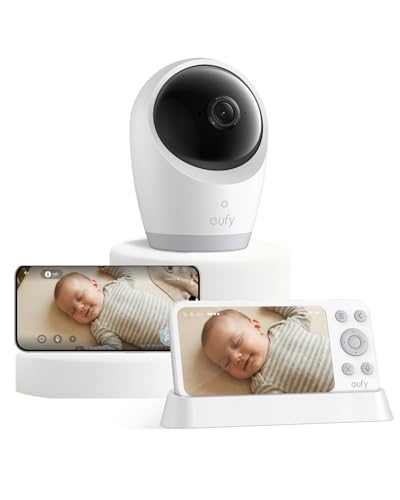
Best of Both Worlds: eufy E21
The fence-sitter’s answer, and a hybrid that runs both ways, holding a 4.2-star rating across 180 reviews., combining a local camera-to-handheld setup like the no-WiFi camp with optional app access when you want it, all with no subscription required for the core features. It’s the monitor for households that want phone check-ins sometimes without betting the nursery on the router, and at its mid-range price it undercuts the smart flagships by a wide margin.
- Works with WiFi, without WiFi, your call night by night
- No subscription for the features that matter
- The mid-price answer when both camps have a point
💡 Pro Tip: If you go the app route with any monitor, do the five-minute security basics the day it arrives, unique password, two-factor on, firmware updated. Every baby-cam horror story traces to a reused password, not a broken product.
The Two-Year Math
The sticker price is half the story. A non-WiFi monitor costs its sticker and nothing more. A smart monitor costs its sticker plus its subscription, which can push expenses toward triple the lifetime cost of the non-WiFi pick. Neither number is wrong, data and remote access are real features worth real money to the parents who use them, but compare two-year totals, not boxes, and the marketing loses its power over you immediately.
From the Registry Side
The monitor is one line on a much longer list, and we built that list the way we build everything, around what families still use a year later. Our full baby registry checklist covers all forty items by category, including where the monitor fits, and if the nursery planning is doubling as shower planning, our sister shop Party Baby Essentials has instant-download baby shower invitations to match.
Frequently Asked Questions
Only if you want its specific features, phone access away from home, sleep analytics, or shared access for caregivers. For monitoring from inside the same house, a dedicated non-WiFi monitor does the core job with better reliability, zero fees, and no privacy questions.
Non-WiFi monitors effectively can’t, there’s no internet connection to attack. WiFi monitors carry the same risk as any smart camera, and the same defense, a unique password, two-factor authentication, and updated firmware close off essentially all real-world incidents, which overwhelmingly trace to reused passwords.
Increasingly, yes, for the features that justify the category, sleep analytics, extended video history, and on some models even breathing alerts sit behind monthly plans. Always price the two-year total, hardware plus subscription, and check which features actually justify going smart for you and your family.
There’s no medical requirement past the newborn months, it’s a household choice. Many families monitor through the crib years for convenience and taper off between ages two and four, and non-WiFi handheld models tend to stay in service longest because there’s no subscription nudging the decision.
For families with a medical reason, preemies, NICU stays, respiratory concerns, its FDA-cleared readings offer real reassurance, and it’s the only consumer option with that clearance. For anxious-but-healthy situations it’s a personal call, vitals data calms some parents and feeds the worry loop in others.
Disclaimer: All product recommendations, setup suggestions, and creative tips are provided for informational and inspirational purposes only. Party Baby Seattle is an independent publisher. We are not officially affiliated with, sponsored by, or endorsed by the specific brands or manufacturers featured in this article. Party Baby Seattle is not responsible or liable for the safety, durability, or real‑world performance of any third‑party products or gear mentioned. Always refer to individual manufacturer instructions, safety warnings, and official age guidelines before use.