The best kids tablets balance entertainment with features parents can actually manage, from parental controls and expandable storage to learning apps and protective cases. Screen size matters too, especially when the tablet needs to work for reading, drawing, games, videos, or travel.
After styling over 800 events, we know kids do not all stay interested in the same kinds of activities. This list covers dedicated learning, a bigger screen, lightweight portability, everyday entertainment, and a more powerful tablet.
What’s in this Guide
- Our Top Picks for Kids Tablets
- What Matters in Kids Tablets
- Best Overall: Amazon Fire HD 8 Kids Pro
- Best for Educational Apps: LeapFrog LeapPad Academy
- Best Big Screen: Amazon Fire HD 10
- Best Lightweight Pick: Jeazan Android 16 Kids Tablet
- Best Splurge: Samsung Galaxy Tab A11+ 128GB
- Setting Up Kids Tablets for Parties and Play
- Frequently Asked Questions
Our Top Picks for Kids Tablets
- Best Overall: Amazon Fire HD 8 Kids Pro
- Best for Educational Apps: LeapFrog LeapPad Academy
- Best Big Screen: Amazon Fire HD 10
- Best Lightweight Pick: Jeazan Android 16 Kids Tablet
- Best Splurge: Samsung Galaxy Tab A11+ 128GB
- Shop All Kids Tablets on Amazon
What Matters in Kids Tablets
Start with what the tablet needs to do most often. A dedicated learning tablet can keep the experience focused, while a standard Android tablet gives kids access to a broader range of apps and entertainment.
Screen size changes how a tablet feels in everyday use. Smaller displays are easier to hold and carry, while larger screens provide more room for drawing, reading, videos, and games. Storage matters once apps and downloaded content start adding up, so expandable storage can give a tablet more room to grow.
Parental controls are another important distinction. Look at how content access, screen time, downloads, and online activity can be managed. Battery life, case protection, charging, and the weight of the tablet matter too, especially when kids will carry it between rooms or take it on trips.
Best Overall: Amazon Fire HD 8 Kids Pro
The Amazon Fire HD 8 Kids Pro earns Best Overall for balancing kid-focused controls with everyday flexibility. Parents can manage settings from a phone, while the slim protective case adds protection without making the tablet overly bulky. Wi-Fi 6 supports connected activities, and the included six-month Amazon Kids+ subscription provides access to additional books, games, videos, and apps. It also comes with a two-year worry-free guarantee.
- Recommended for ages 6 to 12
- Features an 8-inch HD display and 32GB of storage expandable up to 1TB with a microSD card
- Measures 7.95 by 5.41 by 0.37 inches and weighs 11.8 ounces

💡 Pro Tip. Download your child’s must-have apps before giving them the tablet. Parents like the straightforward setup and parental controls, but some report trouble downloading certain apps, particularly YouTube Kids.
Best for Educational Apps: LeapFrog LeapPad Academy
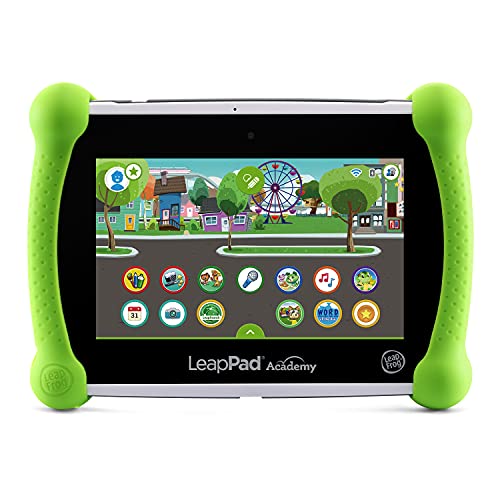
The LeapFrog LeapPad Academy keeps learning at the center with more than 20 preloaded educator-approved apps and a three-month LeapFrog Academy trial with access to additional activities. The included stylus supports drawing and interactive activities, while the removable bumper doubles as a kickstand for hands-free use. Dual cameras and a kid-friendly web browser with parental controls add more ways to learn and explore.
- Recommended for ages 3 to 8
- Features a 7-inch LCD display and 16GB of storage expandable up to 32GB with a microSD card
- Measures 8.5 by 6 by 0.6 inches and weighs 1.6 pounds
💡 Pro Tip. Explore the included learning activities before purchasing additional games. Parents appreciate the educational focus, but multiple parents note that additional games can require separate purchases.
Best Big Screen: Amazon Fire HD 10
The Amazon Fire HD 10 pairs an octa-core processor with 4GB of RAM for games, videos, reading, and everyday apps. Strengthened aluminosilicate glass adds durability, while stylus compatibility adds an option for drawing and writing activities. Parental controls can also help families manage screen time and content access.
- Recommended for kids with parental supervision; no specific age range provided
- Features a 10.1-inch Full HD 1080p display and 32GB or 64GB of storage expandable up to 1TB with a microSD card
- Measures 9.69 by 6.5 by 0.34 inches and weighs 15.4 ounces

💡 Pro Tip. Keep this tablet focused on lighter everyday use like streaming, reading, browsing, and casual games. Parents consistently like the screen quality and overall performance, but several report slower speeds during heavier use.
Best Lightweight Pick: Jeazan Android 16 Kids Tablet
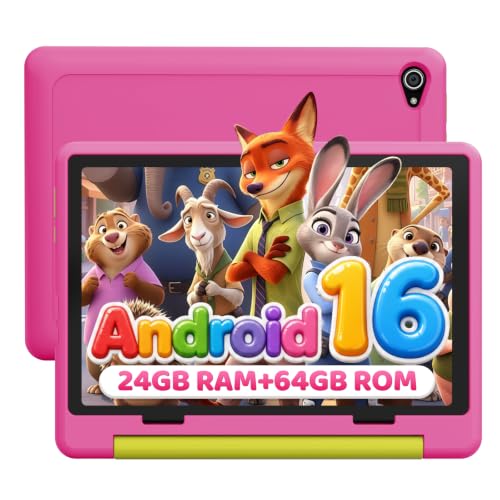
The Jeazan Android 16 Kids Tablet combines its lightweight design with several useful extras for everyday use. A protective case, adjustable stand, and stylus are included, while parental controls help manage access. Wi-Fi 6, Bluetooth 5.4, dual cameras, face recognition, and a low-blue-light reading mode add versatility for learning and entertainment.
- Recommended for ages 3 to 12
- Features a 10.1-inch HD IPS display and 64GB of storage expandable up to 1TB with a microSD card
- Measures 9.49 by 6.3 by 0.55 inches and weighs 1.06 pounds
💡 Pro Tip. Keep the protective case attached when younger kids are handling the tablet on their own. A parent specifically called out the included case alongside the easy-to-use design and parental controls as useful features for a young child.
Best Splurge: Samsung Galaxy Tab A11+ 128GB
The Samsung Galaxy Tab A11+ is the more capable general-purpose option in this roundup, with a 90Hz refresh rate and 6GB of RAM supporting games, streaming, reading, and multitasking. Wi-Fi 6, Bluetooth 5.4, and quad speakers with Dolby Atmos add to its everyday versatility. Samsung also provides seven OS updates and seven years of security updates, giving it more room to stay useful as a child’s needs change.
- General-purpose tablet with parental controls available through Samsung Kids
- Features an 11-inch LCD display and 128GB of storage expandable beyond 2TB with a microSD card
- Measures 10.12 by 6.64 by 0.27 inches and weighs 1.05 pounds

💡 Pro Tip. Add a compatible 25W charger if faster charging matters for your routine. Parents praise the battery performance and report a full charge in about two hours with the faster charger, which is sold separately.
Setting Up Kids Tablets for Parties and Play
Set up a kids tablet before it becomes part of the activity. Connect to Wi-Fi, charge the battery, download the apps or content you want available, and finish the parental controls ahead of time. For parties, tablets work better alongside other kinds of play rather than becoming the only activity in the room.
For younger kids who enjoy hands-on activities, our busy boards guide offers a screen-free option with plenty to touch and manipulate. Our kids karaoke machines guide adds music and performance, while our indoor slides guide offers another way to play away from a screen.
For more holiday gift ideas, our Christmas gifts for 5 year olds guide includes creative toys and activities for kids who enjoy both learning and play.
Planning a Seattle-area celebration with more room for play? Party Baby Seattle’s soft play packages create a dedicated space for toddlers and preschoolers to climb, move, and play together.
Frequently Asked Questions
Many dedicated kids tablets are recommended for ages 3 and up, while some models are designed for older children. General-purpose tablets like the Samsung Galaxy Tab A11+ do not have the same child-specific age recommendations, so parental controls and supervision are important.
No. Downloaded books, games, videos, and apps can work without Wi-Fi. An internet connection is needed for downloads, updates, streaming, and other online features.
Yes. Dedicated kids tablets commonly provide controls for managing content, screen time, apps, and online access. General-purpose tablets can also provide parental control features without being marketed specifically for children.
Yes. A general-purpose tablet can work for kids with appropriate parental controls, apps, and physical protection. It can also offer more flexibility as a child gets older and starts using a wider range of apps.
Not always, but one is a good idea. A protective case reduces damage from everyday bumps and drops, and several dedicated kids tablets already include one.
32GB provides room for a basic collection of apps, games, books, and downloaded content. Larger app libraries, games, and downloaded videos take more space, making expandable storage useful for keeping more content on the device.
Disclaimer: All product recommendations, setup suggestions, and creative tips are provided for informational and inspirational purposes only. Party Baby Seattle is an independent publisher. We are not officially affiliated with, sponsored by, or endorsed by the specific brands or manufacturers featured in this article. Party Baby Seattle is not responsible or liable for the safety, durability, or real-world performance of any third-party products or gear mentioned. Always refer to individual manufacturer instructions, safety warnings, and official age guidelines before use.